> For the complete documentation index, see [llms.txt](https://bb-docs.gitbook.io/microsoft-onedrive-plugin/llms.txt). Markdown versions of documentation pages are available by appending `.md` to page URLs; this page is available as [Markdown](https://bb-docs.gitbook.io/microsoft-onedrive-plugin/help-guide/getting-started.md).

# Getting Started

1. Sign in to your [**Microsoft Azure account**](https://azure.microsoft.com/en-us/free/)
2. Select the **Azure Active Directory** option

<div align="left"><figure><img src="/files/KlasMy8hwiTDsyaPuP5s" alt=""><figcaption></figcaption></figure></div>

3. Register a **new application**

<div align="left"><figure><img src="/files/mUiVXm3nnjnX34U7bEAx" alt=""><figcaption></figcaption></figure></div>

4. Fill out the **form**

<div align="left"><figure><img src="/files/lcexXjl6gLHvQ5TXVySb" alt=""><figcaption></figcaption></figure></div>

5. **Copy** the **Client ID** of the created application

<div align="left"><figure><img src="/files/vrrwoWddceiiYHDNJHoM" alt=""><figcaption></figcaption></figure></div>

6. Create a **new client secret** and **copy** its **value**

<div align="left"><figure><img src="/files/p3AKEv7wilhRIqgoGuWA" alt=""><figcaption></figcaption></figure></div>

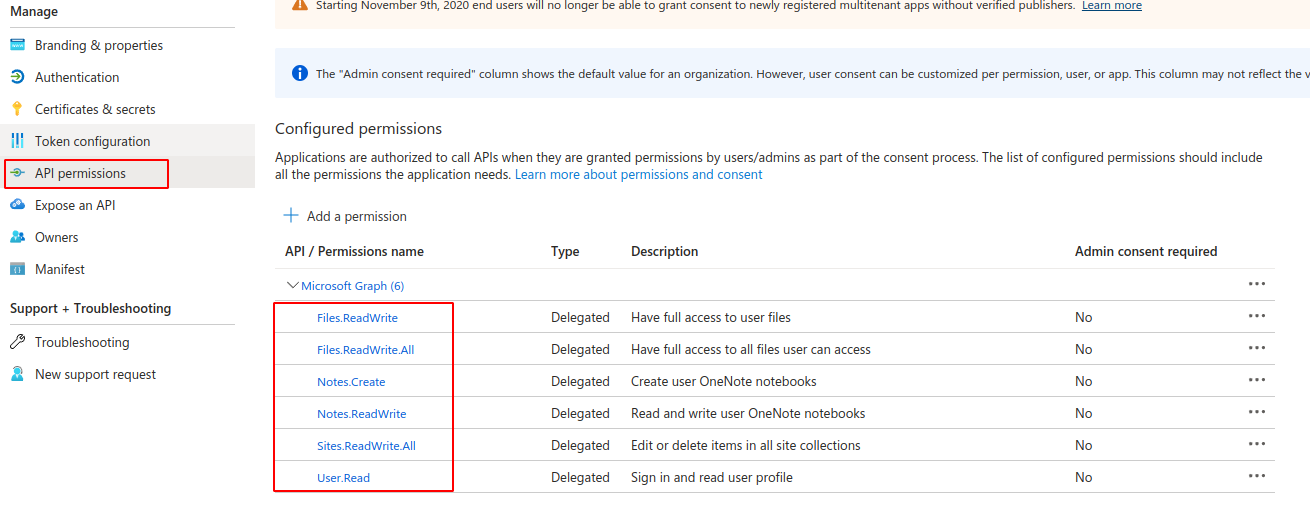
7. Add the **permissions** below

<div align="left"><figure><img src="/files/rFNQecx9hOhX1Fpowil1" alt=""><figcaption></figcaption></figure></div>

8. With the Microsoft OneDrive plugin installed in your project, **paste** the credentials **(App ID, App Secret)**
9. Enable the **"Use a generic redirect URL"** option

<div align="left"><figure><img src="/files/ndVr38qAcG8ytx4qQdrm" alt=""><figcaption></figcaption></figure></div>

10. Performing the **Login**

<div align="left"><figure><img src="/files/OrDU0y3PfWkR63ymUFvV" alt=""><figcaption></figcaption></figure></div>

<div align="left"><figure><img src="/files/dMFsnTVmLwbdsob5Zq62" alt=""><figcaption></figcaption></figure></div>

11. **Log the user out**

{% hint style="info" %} <mark style="color:blue;">**OAuth**</mark> <mark style="color:blue;"></mark><mark style="color:blue;">is inherently stateless so there is really nothing to</mark> <mark style="color:blue;"></mark><mark style="color:blue;">**"sign out"**</mark> <mark style="color:blue;"></mark><mark style="color:blue;">of. When you complete the OAuth flow you receive a token back. That token is used to authenticate the user</mark> <mark style="color:blue;"></mark>*<mark style="color:blue;">every time</mark>* <mark style="color:blue;"></mark><mark style="color:blue;">you call the API.</mark>

<mark style="color:blue;">So to</mark> <mark style="color:blue;"></mark><mark style="color:blue;">**"sign out"**</mark><mark style="color:blue;">, simply wipe any stored access token values from your app's memory/storage and the app will no longer have access to that user's account</mark>.
{% endhint %}

<div align="left"><figure><img src="/files/ZMxHsjwdvzWiAtqyciKv" alt=""><figcaption></figcaption></figure></div>

11. Using the Microsoft OneDrive Plugin **functions**

<div align="left"><figure><img src="/files/zWbEutLnoFBEbEkXDlRH" alt=""><figcaption></figcaption></figure></div>